
Week before event checklist: the switch from deciding to executing

Oniloo
Jul 03, 2026
Most week-before event checklists give you the same list: confirm the vendors, run through the timeline, brief the team, pack an emergency kit, remind the guests. Useful, but it hides the one move that actually keeps the last seven days calm. The final week is not for deciding anything new. It is for doing what you already decided.
That sounds obvious until you notice how many day-of problems trace back to a change someone made on Wednesday for an event on Saturday. The checklist below is built around a single reframe: stop deciding, start executing. Three moves make it real: freeze your decisions, get the plan out of one person's head, and make every remaining task a confirm, not a change.
What most last-minute advice gets wrong
Search "last-minute event changes" and almost every result treats change as something that happens to you: a vendor no-shows, a speaker drops, the weather turns. Pieces like Eventmobi's last-minute-changes guide teach reactive damage control for exactly these external shocks. That advice is fine as far as it goes.
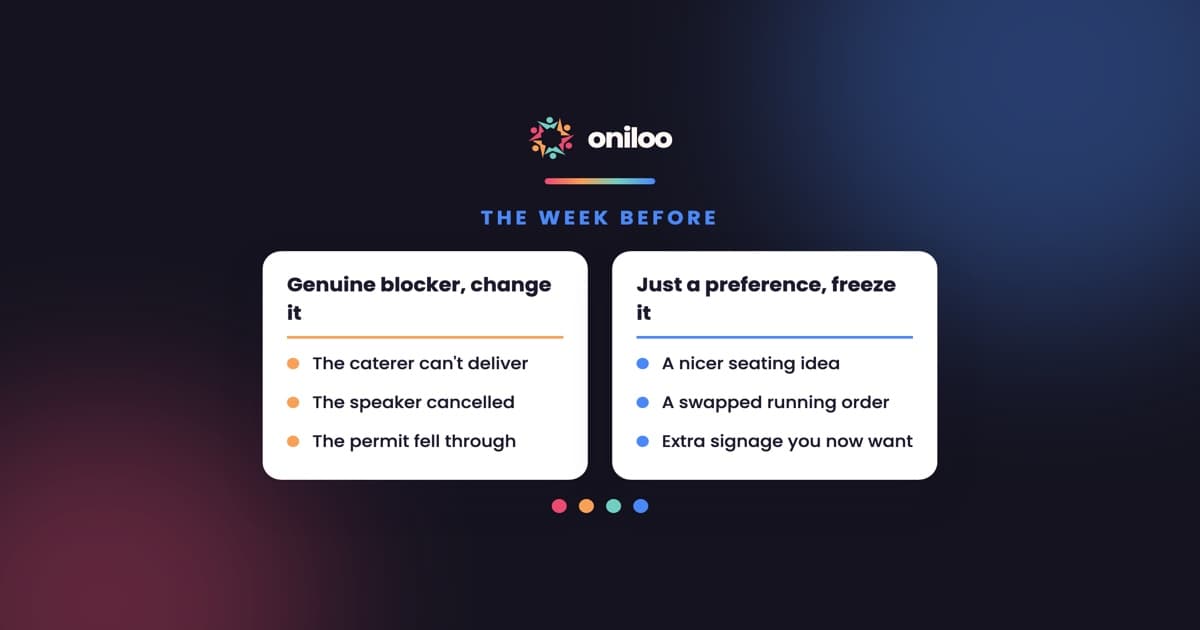
But it misses the bigger source of last-week chaos: the changes you are still making yourself. The new seating idea. The swapped running order. The extra signage you decided you wanted on Thursday. Those are not shocks that happened to you. They are decisions you had not stopped making. External shocks need a fallback. Self-inflicted changes need a freeze.
How do you run the week before an event?
Run it as an execution week, in three moves.
1. Name a decision-freeze date
Pick a date, usually the start of the final week, and say out loud: after this, we execute the plan we have. A change after the freeze needs a strong reason, not a preference.
The freeze only works if everyone knows the test. Write it down:
- A genuine blocker justifies a change. The plated menu can't be delivered. The keynote speaker cancelled. The permit fell through. Something in the plan is now impossible.
- A nicer idea does not. "What if we moved the welcome table to the other wall?" "Could we add a photo backdrop?" "Maybe two courses instead of three?" These are preferences. Preferences are what the freeze exists to stop.
Naming the freeze is not rigidity. It is what lets the last week be spent making the plan happen instead of rewriting it. Experienced planners use this as a rule of thumb, not because change is bad, but because a change in the final week has no slack left to absorb it. A common approach, described in general planning guides like Jotform's event-planning timeline, is to build the whole plan backwards from the fixed event date with buffer between "done" and the day, and to treat the last stretch as polish, not new decisions. The freeze is that principle made into a date on the calendar.
2. Get the plan out of one person's head
Here is the failure mode that quietly breaks the most events: one person holds the whole thing in their head. Who is doing what, which vendor confirmed, what changed last night, what the fallback is if the AV is late. It lives with the lead, and it moves by them reminding everyone.
Across the beta workspaces we watch at Oniloo, this is the pattern organizers describe most: the event runs through one person, and coordination happens by constantly asking or reminding someone to do something. Information gets scattered across an email here, a text there, a call nobody wrote down, and things get lost fast. That single point of knowledge is invisible and, if that person is unreachable on the day, unrecoverable.
So the second move of the freeze week is to externalize the plan into one shared, current view:
- A single list of every remaining task with a single named owner and a due time. Not "the team is on it" - a name.
- A schedule the whole team can see, so nobody is asking the lead what happens at 18:00.
- One place decisions live, so "we agreed X" is written down, not remembered.
The test: if the lead were unreachable for a day, could the team still execute? If the answer is no, the plan is still trapped in one head, and the freeze can't hold.
3. Make the last week confirm-only
Everything left in the final week should be a confirmation of a decision already made, never a new decision. Confirming is not deciding. Here is the confirm-only checklist:
- Day-before vendor confirmation calls. A two-minute call to each key vendor: arrival window, on-site contact, anything changed. This catches a large share of day-of failures while they are still cheap to fix.
- Final headcount to the caterer at their cutoff. Their deadline, not your event date, is your real guest-list deadline. Send the number they need on the day they need it.
- The run of show is printed and shared. The run of show is the internal minute-by-minute script: who does what, every cue, every handoff, and the fallback for each risky moment. (It is different from the schedule, which is the guest-facing "what happens when." Your team runs on the run of show; guests read the schedule.)
- A one-page day-of contact sheet. Every vendor and team contact with their arrival window, in one place the whole team can see, so it works even if signal drops.
- A morning-of huddle planned. Ten minutes: who is where, what changed overnight, the one thing each person watches.
Notice what is not on this list: no new signage decisions, no menu tweaks, no reshuffled agenda. Every item confirms something. Nothing changes something.
A copyable confirm-only checklist for the final week
Screenshot this and adapt the times:
- Freeze: announce the decision-freeze date. The test that it's a confirm, not a change: "A change now needs a genuine blocker, not a nicer idea."
- Externalize: every task has one named owner in a shared view. The test: "If the lead vanished, could the team run it?"
- Confirm: day-before call to each vendor. The test: reading back the plan, not renegotiating it.
- Confirm: final headcount to the caterer at their cutoff. The test: sending the number, not revising the menu.
- Confirm: run of show and contact sheet printed and shared. The test: distributing the plan, not editing it.
- Confirm: morning-of huddle scheduled. The test: aligning on the plan, not rewriting it.
If an item on your list is not a confirmation of an already-made decision, it belongs before the freeze, not in the final week. If it truly can't wait, that is your signal it is a genuine blocker, and you treat it as one deliberately, not as one more preference sliding in.
The one line to remember
A calm final week is not the one with the shortest checklist. It is the one where the checklist is all confirmations and no decisions. Freeze the decisions, get the plan out of your own head, and spend the last seven days making it happen.
Getting the plan into one shared, current view is exactly what a collaborative workspace is for. In Oniloo, that is a shared task list where every task has a single owner and a schedule the whole team sees, so the plan lives with the team instead of in one person's head.